
Mission
People come before the subscription. The emergency call keeps working if there's a short lapse in your subscription. One monthly subscription covers the whole service.
Steve Muzzeroll has spent his career in emergency response and crisis management, and holds an MSc from the University of Leicester. In that world, being ready means three simple things: knowing who to call, having a sure way to reach them, and a quick path to emergency services. Guardian Pin puts that into your pocket. It alerts the people you’ve chosen, and gives you a one-tap way to call emergency services yourself. It doesn’t call them for you.


Commitments
-
The emergency call stays available
It keeps working if there's a short lapse in your subscription. On Android, one tap opens the dialer with the number filled in. On iPhone, one tap opens the call and iOS asks you to confirm. You tap call. Guardian Pin does not place the call. This is separate from the email to your circle.
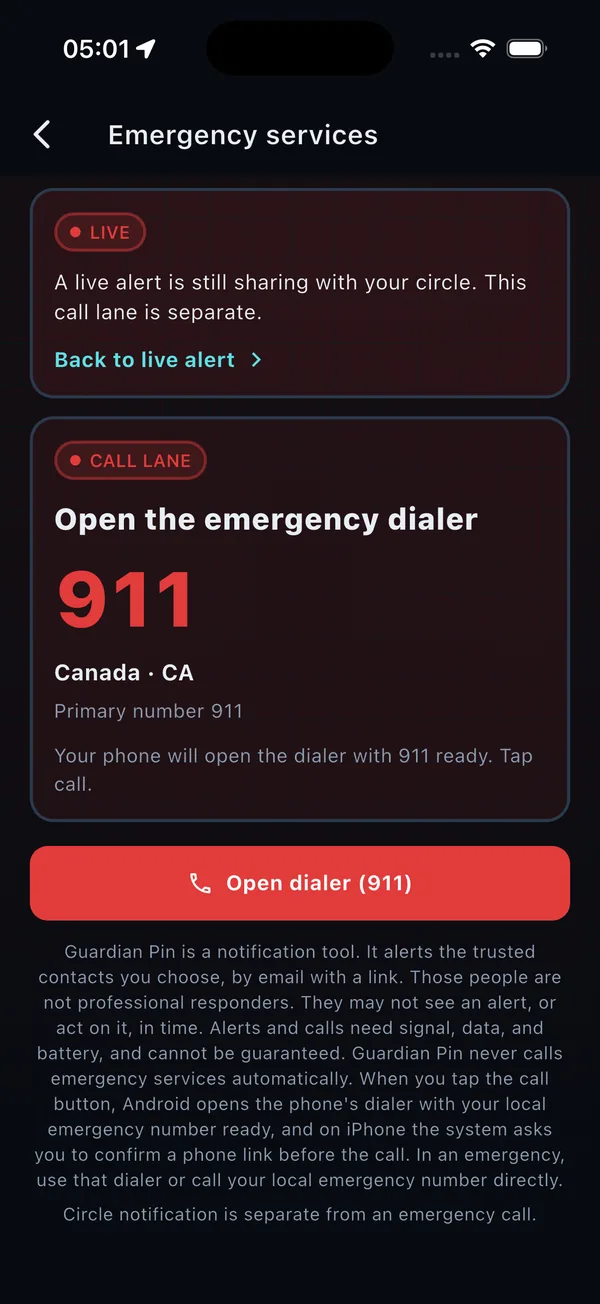
The emergency call screen. Your phone opens the dialer. You tap call. -
One price
A subscription of CA$2.99 per month, starting on day one, covers the whole service: alerts to your circle with your location, recordings you keep for yourself, and sharing your Medical ID. There is no free trial and only one plan. The emergency call button will keep working if there's a short lapse in your subscription. The store shows the price before you confirm.
-
Privacy restraint
There is no ad tracking. Sign-in is Apple or Google. The PIN stays on the phone and is not uploaded. If you allow it, the app reads the address book so you can import people. It does not change that book, and it does not upload the people you do not save.
-
Email and text
Add a contact with an email address, a phone number, or both. They don't need the app, and there's no invite. Contacts with an email get a private link to the alert page. During an alert, you can tap “Text my circle” to open your phone’s Messages app with everyone’s numbers and your location already filled in, then just tap Send. Automatic text alerts are coming in an update soon.
-
Encryption has a limit
Recordings are encrypted with AES-256-GCM only while they wait on the phone. They are decrypted before upload, sent over HTTPS, and not encrypted by the app on the server. That is not end-to-end encryption.

What Guardian Pin will and won't do
Will
- Require sign-in with Apple or Google during first launch, one account per person, before the rest of the app.
- Keep the emergency call reachable with no account, and if there's a short lapse in your subscription.
- Add contacts by phone number or email, and import from the phone address book without changing it.
- Let you add, rename, and delete circles, and keep the primary alert circle until you choose another.
- Email the primary circle a private link to the alert page when an alert is sent. While the alert is active, that page follows the location as it updates. Sharing stops when you end the alert with your PIN.
- Give you a “Text my circle” button during an alert. It opens your phone’s Messages app with your circle’s numbers and a map link to your location filled in. You tap Send, and the text goes from your own phone.
- Ask for the app PIN before an active alert ends. A test alert and the emergency call do not ask for the PIN.
- On Android, open the dialer with the emergency number filled in. On iPhone, open the call and let iOS ask you to confirm. You tap call. Guardian Pin does not place the call.
- Store optional biological sex and gender identity as separate Medical ID fields, shared only with your circle through the alert link when you turn that on. Medical ID is never sent to paramedics or responders.
- Charge one subscription of CA$2.99 per month from the first day for the whole service.
Won't
- Send an invite or a WhatsApp message, or send texts from our servers. The “Text my circle” button opens your own Messages app so you can send the text yourself.
- Require a contact to install Guardian Pin or create an account.
- Collect location when no alert is active.
- Contact emergency services itself, or place the emergency call inside the app.
- Offer a free trial, or a second subscription plan.
- Use ad tracking.
- Encrypt recordings end to end, or encrypt the copy stored on the server.
- Change or delete contacts in the phone's address book.
- Cancel an App Store or Google Play subscription when the Guardian Pin account is deleted.

Stephen Muzzeroll, carrying on business as Guardian Pin. Alberta, Canada. privacy@guardianpin.app